How to Set Up DeepSeek on Janitor AI (Step-by-Step 2026 Guide)
Learn how to set up DeepSeek on Janitor AI step by step to get your API key, base URL, and settings right the first time, plus fixes for common errors.
On this page
- Table of Contents
- What You’ll Need
- Quick Glossary: Confusing Words Explained Simply
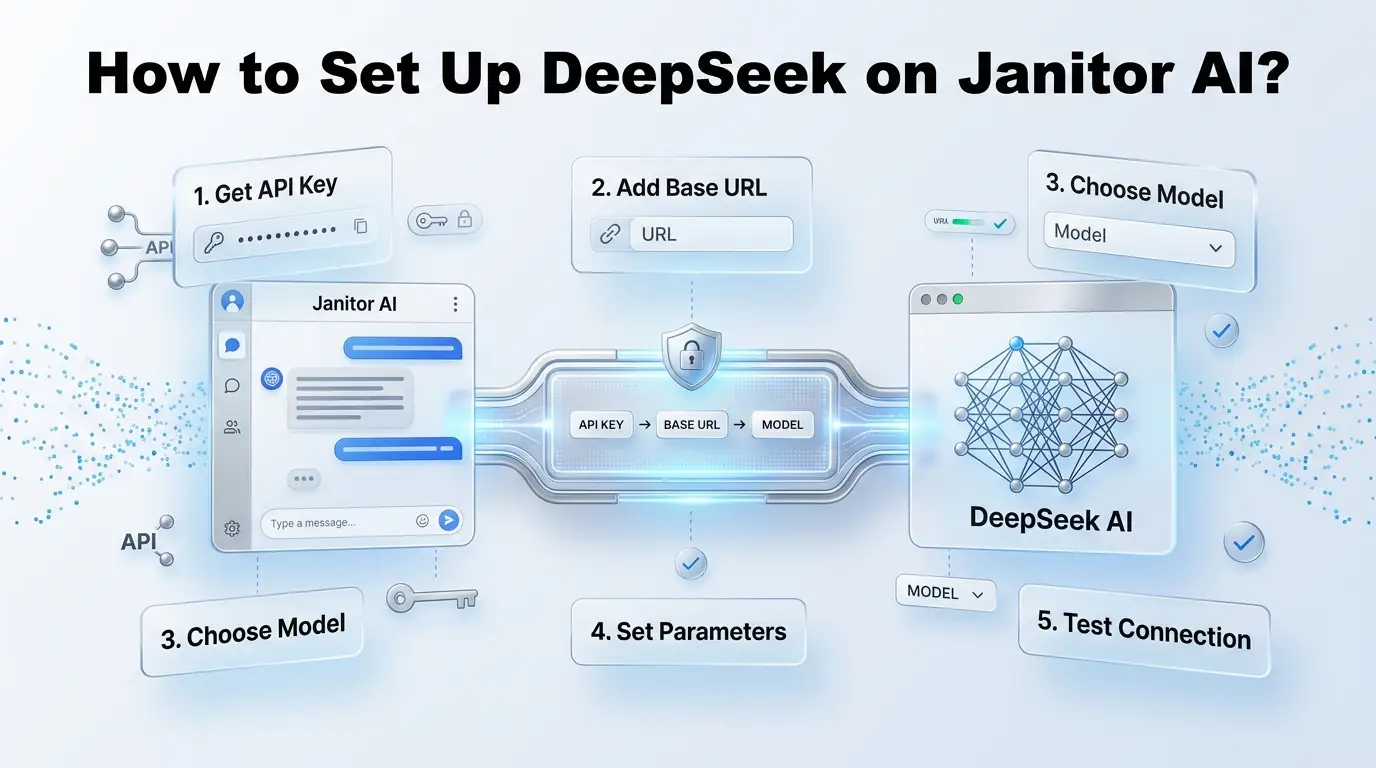
- Step-by-Step: Setting Up DeepSeek on Janitor AI
- DeepSeek Direct vs. OpenRouter: Which Should You Pick?
- Common Errors and Fast Fixes
- Setting It Up on Mobile
- DeepSeek vs. Chutes AI: A Quick Word
- Managing Costs So You Don’t Get Surprised
- Writing a System Prompt That Actually Sticks
- FAQ About How To Set Up DeepSeek On Janitor AI?
If you’ve ever tried to connect DeepSeek to Janitor AI and gotten a scary red “Network Error,” you’re not alone. The good news: the fix is usually just a few small settings, typed exactly right.
This guide walks you through it, step by step, in plain English.
Table of Contents
What You’ll Need
Before you start, here’s what to have ready:
- A Janitor AI account
- A DeepSeek or OpenRouter account (both work, and we’ll explain the difference)
- 5-10 minutes and a device with internet

Quick Glossary: Confusing Words Explained Simply
You’ll see these words a lot. Here’s what they actually mean:
| Word | What It Means in Plain English |
|---|---|
| API | A way for two apps to “talk” to each other. Janitor AI uses an API to send your messages to DeepSeek and get answers back. |
| API key | A secret password-like code that proves the messages are coming from you. Never share it. |
| Base URL | The exact web address Janitor AI uses to reach DeepSeek’s servers. One typo here breaks everything. |
| Model name | The specific AI “version” you want to use, like deepseek-chat. |
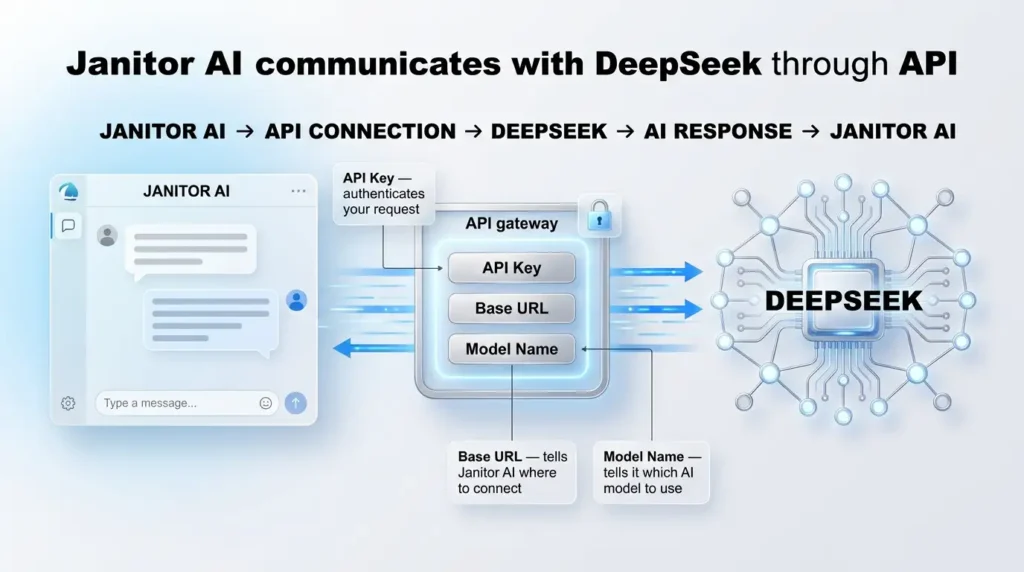
Here’s the important part: Janitor AI does not have its own AI brain built in. It’s just the app you chat in. DeepSeek is the actual AI “brain” doing the thinking, somewhere else on the internet. The API key and base URL are what connect the two.
Step-by-Step: Setting Up DeepSeek on Janitor AI
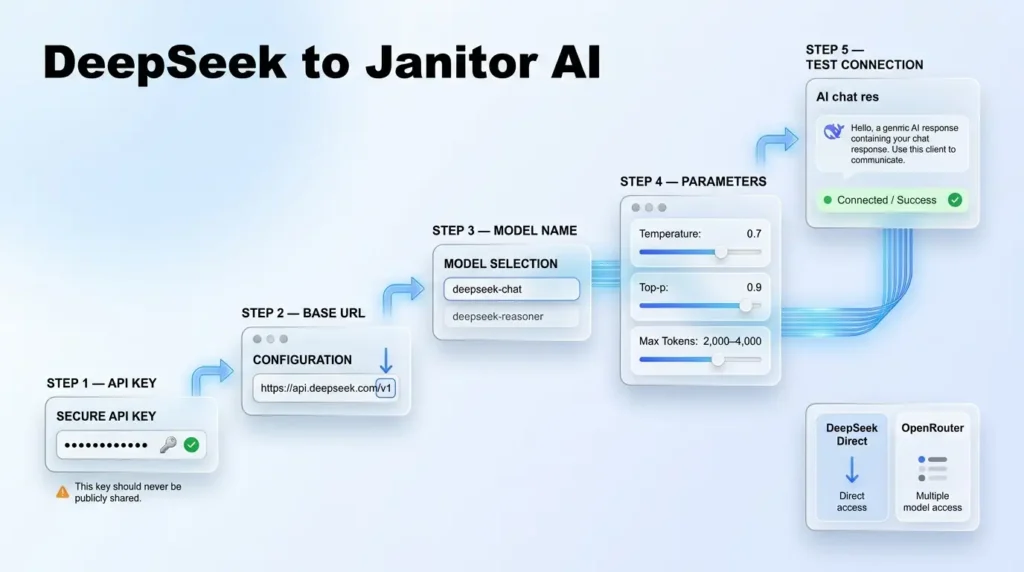
Step 1: Get Your API Key
You have two options:
- DeepSeek Direct: go to DeepSeek’s official platform, create an account, and generate an API key from the developer dashboard. Add a small balance (even $1-2) so the key doesn’t sit at $0, which causes silent failures.
- OpenRouter (easier for beginners): sign up at OpenRouter, generate one key, and you can access DeepSeek plus several other models with the same key.
Step 2: Find the Correct Base URL
This is the step that trips up most people. Type it exactly:
- DeepSeek Direct: https://api.deepseek.com/v1
- OpenRouter: https://openrouter.ai/api/v1
Missing the /v1 at the end is the single most common mistake; it causes a constant connection error that looks like a bigger problem than it is.
Step 3: Open Janitor AI’s API Settings
- Log in to Janitor AI.
- Click Settings.
- Go to API / Model Settings.
- Choose Custom API or OpenAI-Compatible API (DeepSeek follows this same format, which is why it works).
Step 4: Enter Your Details
Fill in these three fields carefully:
- API Key: paste the key you generated in Step 1.
- API Base URL: paste the exact address from Step 2.
- Model Name type one of these exactly:
- deepseek-chat (good all-around choice for most roleplay and chat)
- deepseek-reasoner (better for long, complex stories that need deeper thinking)
Step 5: Set Safe Starting Parameters
DeepSeek behaves a little differently than other AI models by default. Start here:
| Setting | Recommended Starting Value |
|---|---|
| Temperature | 0.7 |
| Top-p | 0.9 |
| Max tokens | 2,000-4,000 |
| Frequency penalty | Low or zero |
If replies feel repetitive or a bit strange, lower the temperature first before changing anything else.
Step 6: Assign It to Your Character and Test
- Open a character.
- Go into its settings.
- Choose Custom / API model.
- Select your new DeepSeek setup and save.
- Send a simple test message like: “Reply in one sentence and tell me what model you are.”
If it replies quickly and clearly, you’re all set!
DeepSeek Direct vs. OpenRouter: Which Should You Pick?
| DeepSeek Direct | OpenRouter | |
|---|---|---|
| Best for | Long, memory-heavy roleplay | Beginners who might switch models later |
| Setup difficulty | Slightly more technical | Very beginner-friendly |
| Pricing | See DeepSeek’s pricing page for current rates | Similar, plus a free tier available |
| Free option? | No | Yes, search for deepseek/deepseek-r1:free |
| Extra models available? | No, DeepSeek only | Yes, dozens of models with one key |
Common Errors and Fast Fixes
| Error | Likely Cause | Fix |
|---|---|---|
| No response / endless loading | Wrong base URL or missing /v1 | Re-check the exact URL, letter by letter |
| “Model not found” | Typo in the model name | Confirm the spelling (deepseek-chat), with no extra hyphens |
| Replies cut off too short | Max tokens set too low | Raise it to 2,000-4,000 |
| Rambling, repetitive text | Temperature too high | Lower it to around 0.7 |
| Bot forgets the story | Missing or weak system prompt | Write a clear persona description in character settings |
| Error 429 | Rate limit reached (often on free tiers) | Wait about 10 minutes, or upgrade your plan |
Setting It Up on Mobile
Good news: the process is basically identical on the Janitor AI mobile app, just with a smaller screen.
- Open the app and tap your character.
- Tap API Settings (usually in the top corner).
- Set the provider to Custom / OpenAI Compatible.
- Enter the same base URL, API key, and model name as the desktop steps above.
- Save and send a test message.
One extra tip for mobile users: keep your app updated. Older app versions sometimes show connection errors that have already been fixed in a newer release. Before assuming your settings are wrong, check for an app update first. This alone resolves a surprising number of mobile-only connection problems.
DeepSeek vs. Chutes AI: A Quick Word
You may also see people mention “Chutes AI” as an alternative way to access DeepSeek models. Chutes AI is a hosting layer that runs DeepSeek models with subscription-based access, and it includes a privacy-focused “Trusted Execution Environment” option. For most casual users, DeepSeek Direct or OpenRouter is simpler to set up and troubleshoot. Chutes AI is really only worth considering if you specifically need its privacy features.
It’s worth understanding the data flow before you dive in:
- You type a message in Janitor AI.
- Janitor AI sends that message to DeepSeek (or OpenRouter) through the API.
- DeepSeek’s servers process it and generate a reply.
- The reply travels back through the API to your Janitor AI screen.
This means your conversations are handled under DeepSeek’s privacy policy during that step, not only Janitor AI’s. If privacy matters to you, it’s worth reading the provider’s data retention terms before long roleplay sessions, especially if you’re sharing personal details in character backstories.
Managing Costs So You Don’t Get Surprised
Janitor AI does not automatically stop you from spending once your key is connected, it simply keeps sending requests as long as your account has balance. To stay in control:
- Check your usage dashboard on the DeepSeek or OpenRouter site regularly
- Set a spending alert if your provider offers one (many notify you at 80% of a budget)
- For very long chat sessions, consider starting a fresh conversation occasionally, since longer context means more tokens used per message
Writing a System Prompt That Actually Sticks
Most “my bot forgot who it is” complaints trace back to one thing: a weak or missing system prompt. This is the background instruction that tells the AI how to behave for the whole conversation, not just one message. Clear instructions matter here, as they do in any good AI prompt. A strong system prompt usually includes:
- A short description of the character’s personality (calm, sarcastic, cheerful, etc.)
- Key backstory details the bot should remember
- How it should handle situations that aren’t covered in the opening scene
- Any speech patterns or phrases specific to that character
A vague system prompt like “friendly character” gives the AI almost nothing to work with. A detailed one, even just three or four sentences, makes a noticeable difference in how consistent the roleplay feels over a long conversation.
For more practical guides, see the best AI tools for 2026 or visit our blog.
FAQ About How To Set Up DeepSeek On Janitor AI?
Is DeepSeek free on Janitor AI?
There’s a limited free option through OpenRouter’s free-tier model. Full, faster access through the paid tiers costs a small amount per million tokens, still much cheaper than many other AI providers.
Why does my bot keep forgetting who it is?
This is almost always caused by a missing or vague system prompt. Add a clear, detailed persona description in the character’s settings.
Is it safe to use my API key like this?
Treat your API key like a password. Never post it publicly, and if you ever think it’s been exposed, regenerate a new one immediately from your dashboard.
Can I switch models later without redoing everything?
Yes, if you use OpenRouter, you can switch between DeepSeek and other models just by changing the model name field.
AI tools change often. We check our guides and update them when steps change. Spotted something out of date? Tell us and we’ll fix it.